
AI agent management
One control point for all your AI.
Keep the AI platforms and agents your teams already use. FEATit is the independent mission control for people and AI agents: one place to plan, steer, govern and verify their work.
- Any agent from any vendor, or a local model.
- It acts only as far as your rules allow.
- Every step is recorded, so whoever comes next sees what happened.
- Every agent on every connected machine, in one view.
On your machines
- AIspec-agentPriya’s laptopClaude CodeLive, reported by the desktop appF-0031 specWriting the specSpec confirmed
In your data center
- AIbuild-agent-01On-prem serverLive, reported with the agent’s own keyT-0201 Detect overdue invoicesIn progressDone
- AIbuild-agent-02On-prem serverLive, reported with the agent’s own keyT-0202 Schedule and retry remindersIn progressWaits for PriyaIn progressDone
In the cloud
- AIqa-agentHosted agentcloud VMLive, reported with the agent’s own keyF-0031 test planRunning testsTest plan run
F-0031Payment reminders· One plan · one set of rules · one record
Decisions and questions
D-0012 · D-0013spec-agent asks Jonas2 answered
- D-0012 Remind at 7 or 14 days overdue?Make it configurable
- D-0013 Which reminder settings should be configurable?Interval and retries, per customer
- D-0014build-agent-02 asks PriyaTest credentials are missing. Can you add them?OpenAdded to the team vault
Why your agents get more done
Claude Code and Codex are already very capable. FEATit adds what helps them get more done with your team: across tools, across people, and on the record.
Agents wait less on you. Their permission requests reach your phone, browser or desktop app, so a waiting agent gets its answer sooner.
Fewer do-overs. On top of its own context files, an agent gets the whole item in one read: the request, the decisions and their reasons.
Work survives a handoff. Plan, decisions and history stay on the item, so the next agent or person picks up where the last one stopped.
More agents at once. Agents from any vendor sit on one board as working, waiting or stuck. Watch them, and start the next one from anywhere.
The right model for each job. Mix leading-edge agents with cost-efficient or local models, and see what each item cost.
Fewer surprises after release. Where you choose, someone who didn’t do the work signs it off before it counts as done.
Any AI setup
Leading-edge cloud agents, cost-efficient cloud models, local models on your machines, or your company’s own platform, connected through the standard agent connector (MCP), the command line or an API. Mix and change them as you like. FEATit’s own AI features are optional, can be switched off, and run on the model you pick.
Cloud AI
Leading-edge agents · Cost-efficient models
Local AI
Your models, your machines
Your AI platform
Any runtime
Run FEATit in our cloud or on your own servers.
The right AI for the job
In the demo, each job went to the AI that suits it, and each agent reported what it used. A local model would take the work where data must stay in-house.
| Agent | Job | Runs on | Reported | Cost |
|---|---|---|---|---|
| AIspec-agent | Drafting the spec | Leading-edge cloud model | 41k tokens | €1.90 |
| AIbuild-agent-01 | Building | Most effective cloud coding model | 512k tokens | €3.40 |
| AIbuild-agent-02 | Building | Most effective cloud coding model | 468k tokens | €3.10 |
| AIqa-agent | Running the test plan | Cost-efficient cloud model | 176k tokens | €1.40 |
| Total | €9.80 | |||
Ready-made adapters
Ready-made adapters reach the common cloud coding agents that can be started from outside. Each needs one thing to connect.
GitHub issue
Agents that pick up an assigned or mentioned GitHub issue
Install the GitHub App on the repository
Webhook
Agents started from a webhook, and your own systems
Paste the webhook URL and its API key. FEATit signs every call
Vendor API
Agents whose vendor offers an API to start a session
Paste the API key from your Cursor, Devin or Jules account
| Agent | Adapter |
|---|---|
| Claude Code Routines | Webhook |
| Claude Code GitHub Action | GitHub issue |
| Codex cloud | GitHub issue |
| Cursor Cloud Agents | Webhook or Vendor API |
| GitHub Copilot cloud agent | GitHub issue |
| Devin | Vendor API |
| OpenHands | GitHub issue |
| Jules | Vendor API |
Need another platform? Further adapters can be provided. Tell us what you use when you request early access, or send it as feedback from inside FEATit.
What your agent receives
Everything it needs to do the job well, and nothing it has to go looking for. Here is what the agent building the demo’s payment reminders is given.
One read gives your agent the item’s whole working context: its parent, the request and how it was filed, the decisions, the plan, the documents, the open questions and the files. A work area can also give each kind of work its own skill, which the agent receives with the item.
- The task: Detect overdue invoices, part of Payment reminders
- The 7 customer requests behind it, in their own words
- The decision, by Mira: 7 paying customers asked. Weak receivables management is our top churn reason
- The plan, confirmed by Jonas, and its 5 tasks
- The rules: it may build alone, and merging needs a person
- What to report back: its comments, the code it delivers and each move it makes
What it may do alone
When an agent may not act alone, its move waits for a person to confirm it, where everyone can see it. Closing can require someone other than the one who did the work.
A rule for each step: an agent may act alone, needs a person’s confirmation, or may not act.
What is recorded
Each agent session is recorded with the name the agent gives, marked unconfirmed where FEATit cannot check it. The code it delivers is linked to that session, and its token use is recorded as it reports it.
What each agent cost is shown per item and per release, in euros, at your own prices. Your agents keep running on the AI plans you already pay for.
Watch and steer from anywhere
Watch your agents’ terminals live, from your Mac or Windows PC, a browser, your iPhone or iPad. When one waits for you, type the answer and send it. Start the next session on your Mac or Windows PC from FEATit. Open the files your agents work on, with their commits and diffs, and comment or hand a change to an agent.
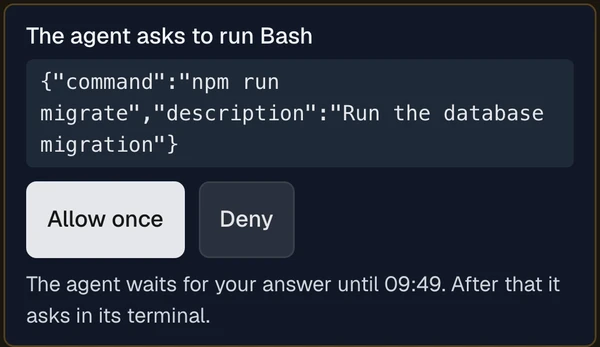
When an agent asks permission, your phone tells you which agent waits, and on which machine. Approve or deny it there, or from the desktop app or any browser. In a conversation you run through FEATit, its questions are answered the same way. Every answer is kept on the record, with the device it came from.
The terminal travels from your Mac or Windows PC to your screen over your own VPN, such as Tailscale, never through FEATit’s servers. Every send is on the record, without its text.
How watching and answering works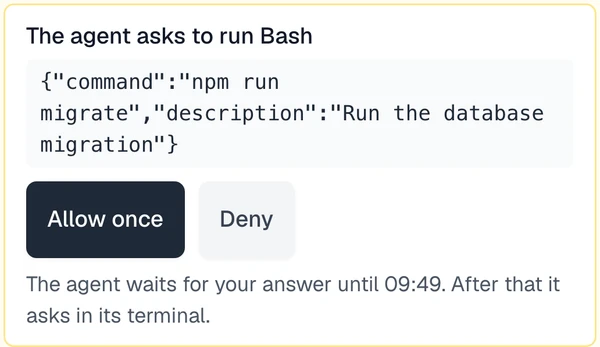
One item, worked by AI agents and people
AI agents work wherever they run: on a laptop, a server or in the cloud. People work wherever they are: on the phone, laptop or desktop, in the browser or the apps, often with their own personal AI agents. All of them work the same item, and its history ties them together.
- The personJonas sets I-0142 to Urgent: 3 paying customers affected.
- AIThe agentAsks for the most important open work, and gets I-0142, PDF export drops pages after 50 lines.
- AIThe agentTakes I-0142, and says so. Everyone now sees build-agent-01 holds it.
- AIThe agentReads the reporter’s answer — “Only ones with more than 50 lines.” — and plans around it.
- AIThe agentDelivers the fix. The change is linked to this session and to the item automatically.
- AIThe agentTries to mark it done. Refused: this team requires the finished code before work counts as done.
- AIThe agentMarks I-0142 done, with the code that delivered it.
- The personPriya reviews the change, merges it and closes the item, as someone other than the agent that did the work.
Full transparency, one click away
Every step of the process is on the item: who did what, people and AI agents alike, and what was decided and why. The summary stays short. Every detail, from the agent’s session to its code and token use, is one click away.
PDF export drops pages after 50 lines
- Tue 10:30Jonasset priority Urgent and linked I-01423 paying customers affected
- Tue 11:02AIbuild-agent-01took it, with a plan1. Reproduce with a long invoice 2. Paginate the line table
- Tue 11:48AIbuild-agent-01landed commit a41c9e2, attributed to its sessionTests added · 182k tokens reported by the agent
- Tue 14:20Priyareviewed and merged it
- Tue 14:20Priyaclosed it — not the agent that implemented itRelease 2.4.1 contains a41c9e2
Connect any assistant
An AI assistant connected to FEATit works on items as a person on your team does, within the roles you grant it.
What an assistant can do
- Read and search items
- File new items
- Comment on them
- Move and close them
- Hand them to someone
- Keep a plan and ask questions
- Read and write documents
- Manage releases
- Create a work area, once you confirm it
Connecting takes a minute
Claude Code, Codex, OpenCode, Cursor and Claude Desktop connect from the Connect an AI assistant page inside FEATit. You sign in once in the browser, and no key is copied anywhere. Any other assistant that uses the standard agent connector (MCP) or runs a command connects the same way.
How to connect each assistantBring your agents
Give your agents work, rules and a record, whichever vendor they come from, and make things better together.
Seen from your seatHow solo founders run their agents